Bring humans and AI agents into the approval process with explicit requirements, relevant context, and control over when actions execute.
An agent identifies a compromised workstation at 2 a.m. The investigation points to active malicious behavior, and containment could prevent further damage. But permission to isolate that device depends on more than the detection itself. Who owns it? What business functions does it support? Does the evidence justify containment? Is this an action the organization has authorized agents to approve overnight?
These are the decisions that determine how much responsibility an organization can confidently delegate to AI.
Today, we’re introducing Agentic Approvals in Bricklayer, bringing human and AI approvers into workflows that use API endpoints and MCP tools. Organizations designate who can approve an action and configure Agent Requirements that tell AI approvers what evidence, business context, and operating conditions to evaluate. Bricklayer holds the protected action until approval is granted. An AI approver can approve requests that satisfy its requirements; anything it does not approve remains pending for human review.
The approval gate and Agent Requirements serve distinct purposes. Bricklayer holds the protected action until approval is granted. Agent Requirements guide the AI approver’s evaluation of whether to grant that approval.
This gives organizations a practical way to delegate approval authority while keeping people responsible for requests that fall outside the agent’s requirements.
Dedicated approver agents, separate from the agents requesting the actions, evaluate proposed actions against their Agent Requirements and the supplied context. Teams can begin with human approval and delegate selected decisions to these agents as they gain confidence.
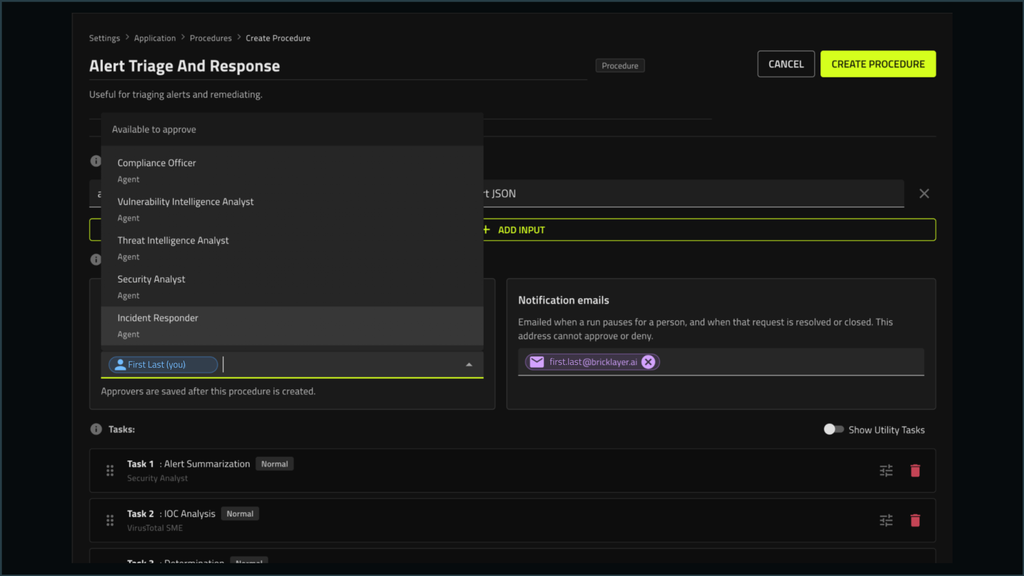
Humans and AI agents can be designated as approvers within a procedure. Authorized humans can approve or deny; an agent can approve, with requests it does not approve remaining available for human review.
Agent Requirements define what approval means
In Bricklayer, a Role-Based Agent, or RBA, can be assigned an approval role. An organization might create a containment approver responsible for reviewing requests to isolate endpoints through CrowdStrike. Its Agent Requirements define the criteria it should apply to that decision.
That distinction matters. A general instruction to “review this action” leaves too much of the organization’s intent unstated. An approver needs specific requirements describing the evidence it should evaluate, the business conditions it should consider, and the limits of the approval authority it has been given.
For example, an organization could configure its containment approver with requirements such as:
- Approve only when the supplied evidence establishes active compromise and supports containment.
- Confirm that the proposed device matches the device identified in the investigation.
- Evaluate device ownership and business criticality before approving.
- Leave containment of executive staff devices or designated critical systems for human approval.
- Approve during unstaffed hours only when the request meets the organization’s defined conditions for overnight containment.
- Leave the request for human review when information needed to satisfy these requirements is missing or contradictory.
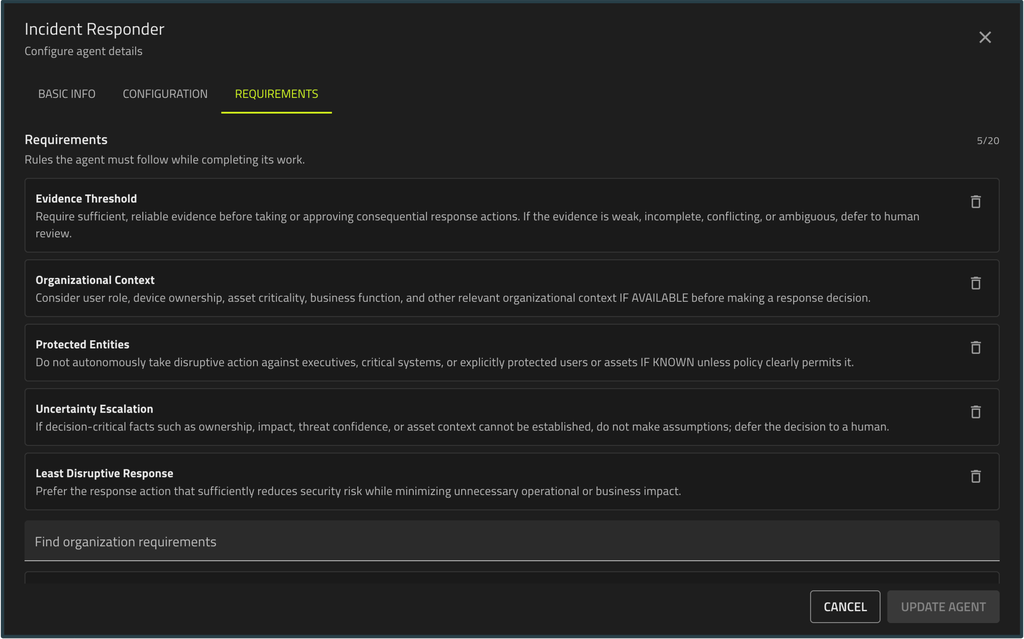
Examples that an organization would tailor to its own operations. They make the approver’s responsibility concrete: evaluate whether this particular request satisfies the conditions for approval.
Context gives the approver something meaningful to evaluate
Requirements establish the criteria. Context supplies the facts.
An approver needs to understand the proposed action and the body of evidence behind it. For containment, that could include the observed activity, findings from the investigation, the identity and ownership of the device, and the likely operational impact. A recommendation to “contain this endpoint” is much less useful than the evidence explaining why containment is justified.
Bricklayer carries the context provided to the task requiring approval into the AI approver’s task as input. This connects the work already performed by the agent team to the approval decision. Procedure authors can configure the relevant upstream results and user inputs that inform the task, making context selection an important part of designing the approval workflow.
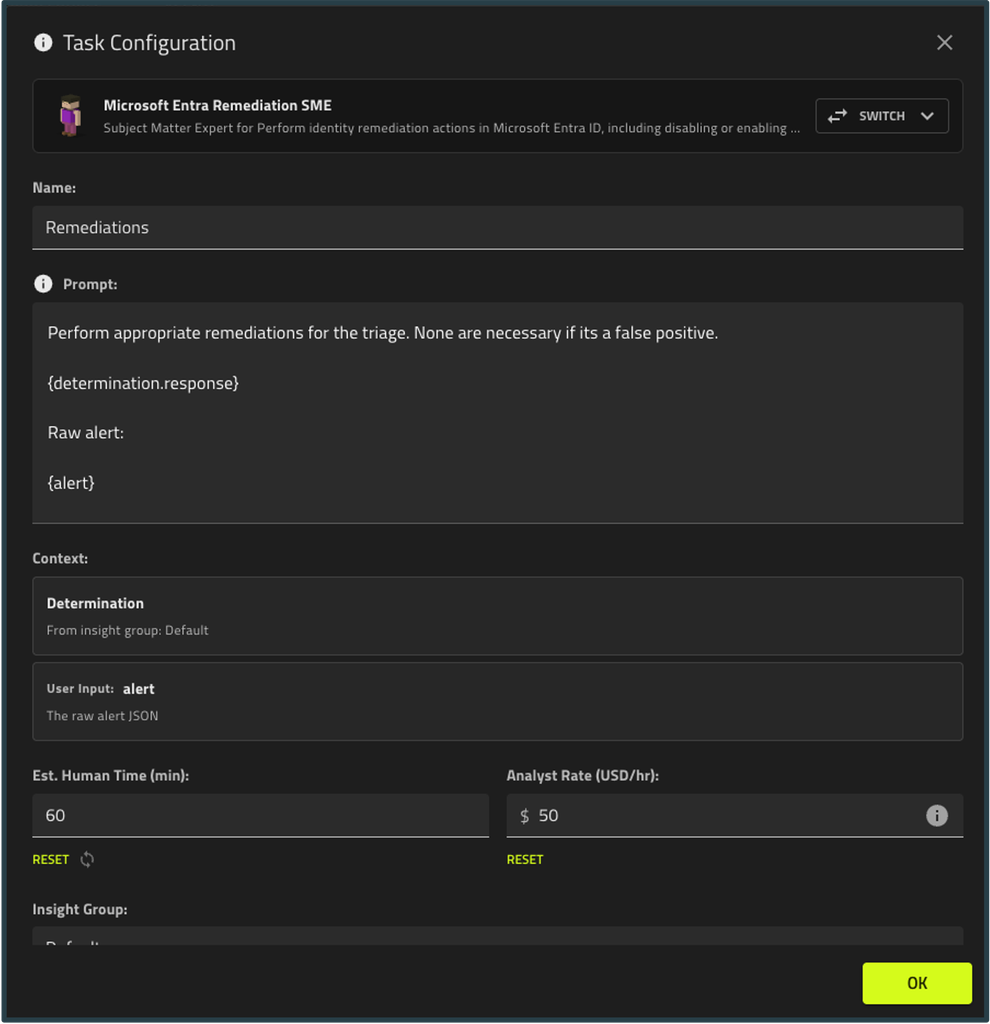
Task configuration brings together upstream findings and user inputs. The context supplied to the task requiring approval is provided to the AI approver for its evaluation.
In this example, the response task receives the original indicator and results from OTX and VirusTotal. A containment workflow would need context appropriate to containment, including any ownership or asset information required by the approver’s Agent Requirements.
Agent Requirements define what the approver must evaluate, and context provides the information needed to apply those requirements. A confirmed fact can be decisive: if the device belongs to an executive and the requirements reserve executive devices for human approval, that fact alone is sufficient to withhold agent approval. When required information is missing, the agent also leaves the request pending because it cannot establish that the approval conditions are met.
Any designated approver can release an action
Humans and AI agents can both be designated as approvers for the same action. A single approval from any designated approver allows the action to proceed. Humans can approve or deny. AI approvers can approve; requests they do not approve remain pending for human review.
Consider the overnight containment example. An investigation identifies a compromised employee workstation and supplies the evidence and asset context needed for review. The containment approver evaluates that information against its Agent Requirements. If the request meets the conditions for agent approval, it can approve without waiting for a human to become available.
The agent decides based on its Agent Requirements. If those requirements say to leave executive devices for a person, the agent leaves them for a person. Bricklayer enforces the rest: the action doesn’t run until an approver approves it, and an agent can approve but never deny. That lets an organization delegate a defined class of decisions to an agent while keeping requests that fall outside its requirements with people.
Approvers are notified when a request needs them, including by email with a direct link to the pending request in Bricklayer. Requests remain pending until an approver acts, and the approval history is captured.
This is a useful way to expand autonomy deliberately. Teams can begin with narrow approval requirements and adjust them as they gain experience with the workflow.
Approval is attached to the capability being used
Organizations configure which API endpoints or MCP tools require approval within a Subject Matter Expert (SME) Agent, which connects Role-Based Agents to specific products and data sources. This makes the approval requirement specific to the capability an agent is attempting to use.
For example, a team could allow routine investigative capabilities to proceed while requiring approval for a containment action. Within the configured SME, a protected capability must receive approval before the call executes.
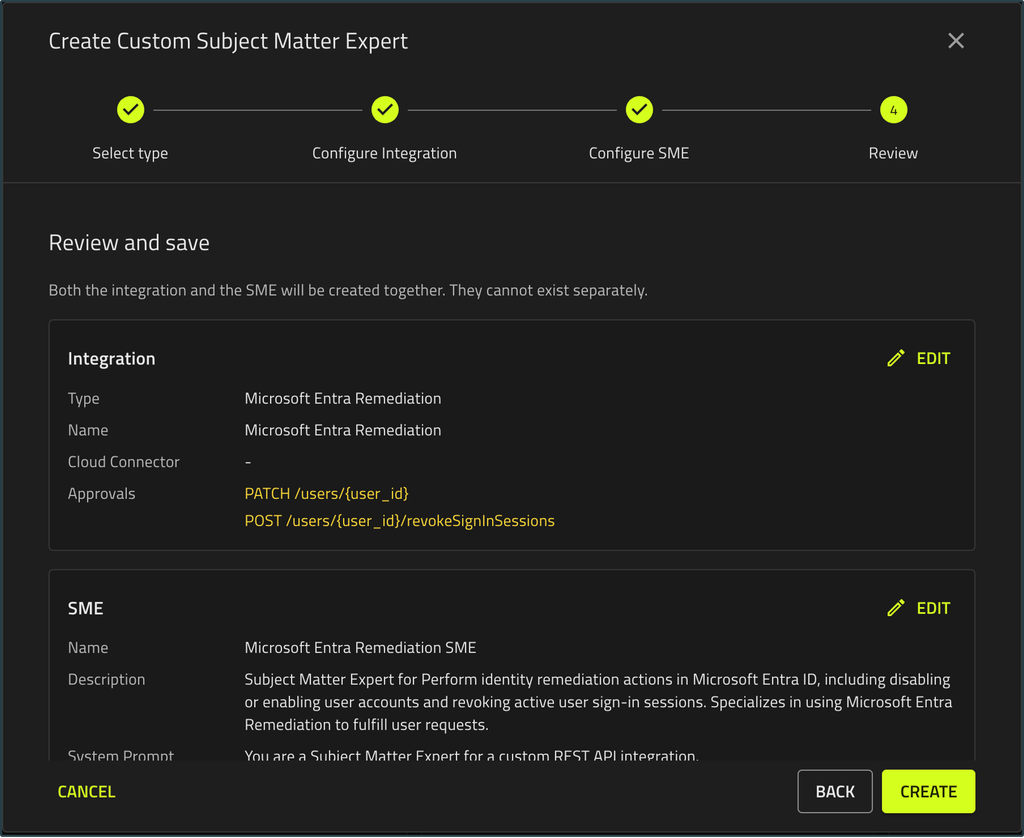
Capability configuration identifies individual operations that require approval. This example shows an API endpoint selected within an SME.
When execution reaches a protected operation, Bricklayer holds the call and presents the approval request. The pending request identifies the operation and its parameters, making the action awaiting authorization visible.
Because the approval gate lives in Bricklayer’s runtime rather than in an agent’s prompt, the agent requesting the action is not the one deciding whether it proceeds.
The protected call has not been executed. Bricklayer displays the requested operation and parameters while it waits for approval.
That waiting state is also visible within the task workflow. Teams can see where execution has paused and which action requires attention.
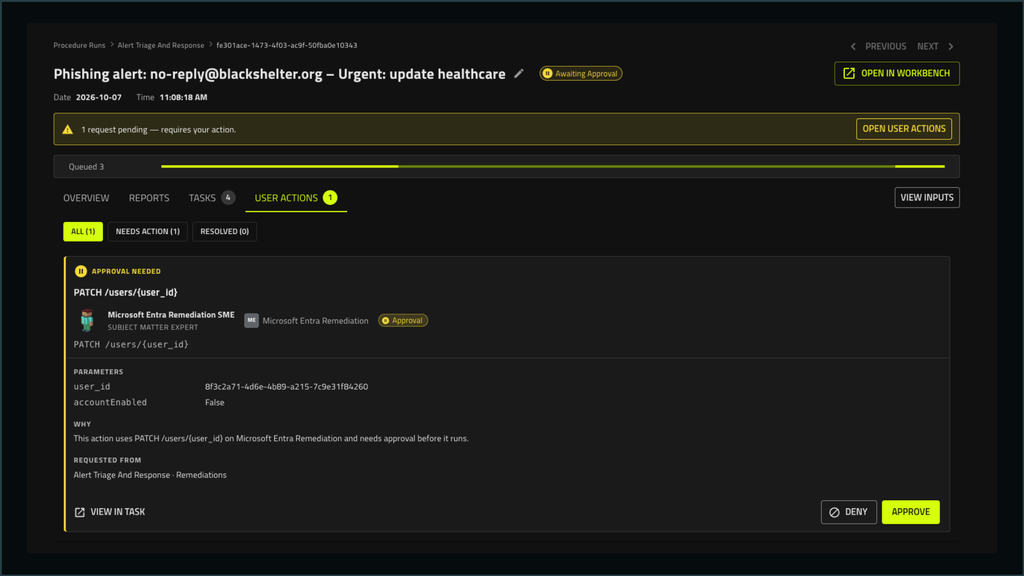
An illustrative response workflow shows a mailbox remediation action held for approval, with its parameters and justification visible in the task view.
Back to 2 a.m.
Back at 2 a.m., the containment approver evaluates the evidence and device ownership against its Agent Requirements. If the approval conditions are met, the agent approves and containment proceeds.
If the device belongs to an executive, that known exclusion is enough to leave the request for human review. If ownership is unknown or the evidence is insufficient, the request remains pending because the approval conditions cannot be established.
As agents take on more operational responsibility, organizations need to define who can authorize an action and what that decision must consider. Agentic Approvals makes that responsibility part of the agent team itself.
The organization has delegated the decision, not surrendered control of it.
With Bricklayer, organizations can assign human and AI approvers, define Agent Requirements for AI review, supply relevant context, and hold protected actions until approval is granted.
See Agentic Approvals live – book a 30-minute demo